Home Join the WhatsApp group, and note the date
Join the WhatsApp group, and note the date
Tap the highlighted part of the screen.
Where to begin
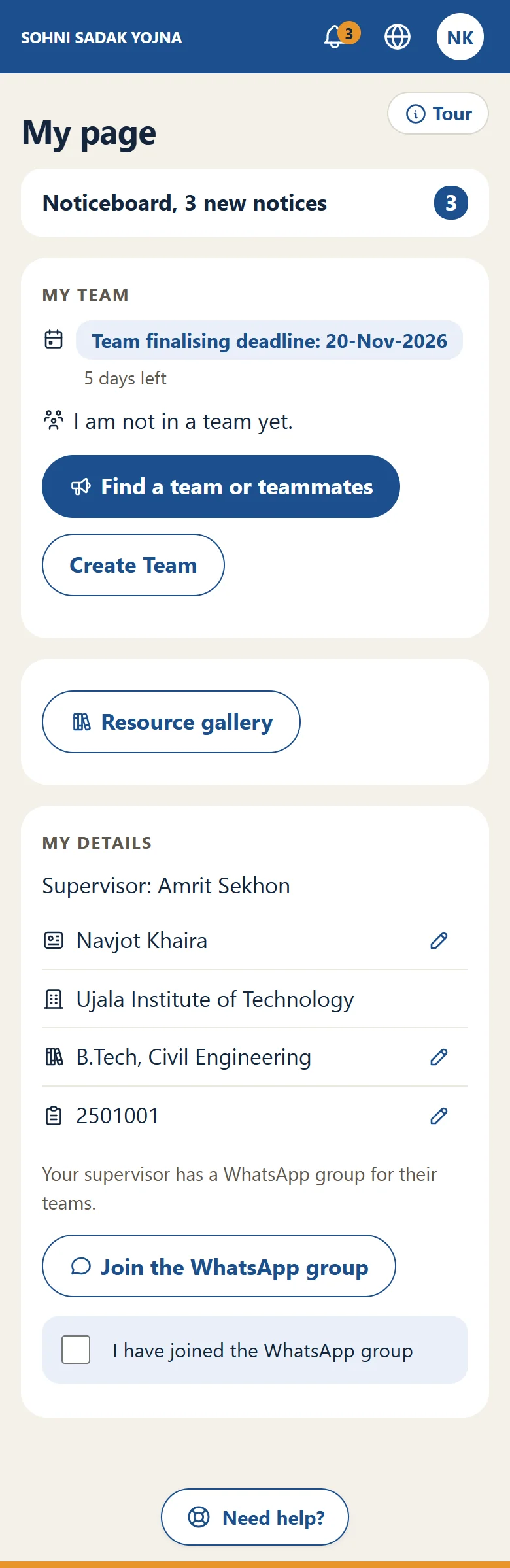
Best seen on a phoneOnce you have registered, two things help you get started: your supervisor's WhatsApp group, where everyone stays in contact, and the team finalising deadline. Both are on your page. Here is Student Navjot's.
My page
Under My team, the team finalising deadline is shown, with the number of days left. Under My details, the portal says your supervisor has a WhatsApp group for their teams.
Tap Join the WhatsApp group.
WhatsApp opens
WhatsApp opens, and Navjot joins the group. Back on My page, Navjot may tick I have joined the WhatsApp group. It saves at once, and says Saved.
In this topic (scroll down for more topics)
: topics
Back to the portal Back to the guide Home: choose another section
Link copied. Paste it into a message.